
1. Overview
This guide takes you from nothing installed to a ModBee Node UIO running your
first Ladder program. You do not need to have used OpenPLC or the Node UIO
before. Every step shows what you will see on screen.
| Page | What you do |
|---|---|
| 1. Overview (this page) | Learn what the pieces are and how they fit together |
| 2. Install | Install the editor, the Node UIO board package and the ModBee libraries |
| 3. First project | Set the project up for the Node UIO and understand PLC tasks |
| 4. First Ladder program | Build a small program, compile it, upload it and watch it run |
| 5. Next steps | Where to go for more |
The pieces
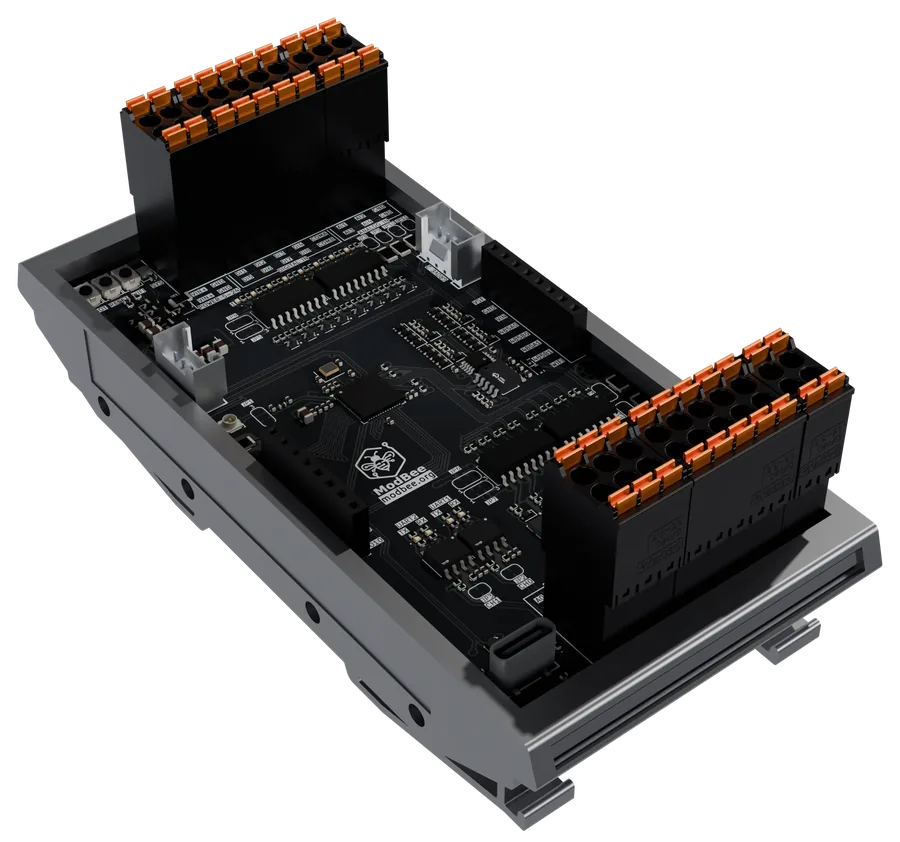
ModBee Node UIO. A DIN-rail controller for control panels:
- 8 isolated digital inputs and 8 digital outputs, 5-24 V DC
- 4 analog inputs (0-20 mA or 0-10 V) and 2 analog outputs
- 2 RS485 ports, Wi-Fi, Bluetooth LE, and USB-C for programming
- 2 Grove I2C sockets and HATs (for example, cellular or LoRa) for expansion
Its hardware, wiring and pinout are documented in the
modbee-node-uio repository.
ModBee OpenPLC Editor. The program you write the PLC program in, on your
PC. It is based on the OpenPLC Editor and
speaks the same IEC 61131-3 languages: Ladder (LD), Function Block Diagram
(FBD), Structured Text (ST), Instruction List (IL) and Sequential Function
Chart (SFC). It compiles your program into firmware and uploads it to the
board over USB.
The board package (com.modbee.node-<version>.vpp). It adds the
ModBee Node UIO to the editor's list of boards: its memory layout, its
2 MB of external RAM and its settings screens. You install it once.
The ModBee libraries (.stlib files). Ready-made function blocks you
place in your program. Each library carries the C/C++ code it needs, so there
is nothing else to install. They come as one ZIP,
modbee-openplc-libraries.zip, or one file per library:
| Library | What it gives you |
|---|---|
ModBee Node UIO (node-uio) |
The board's inputs and outputs, analog scaling and calibration, HAT power, network, sleep and restart |
ModBee Node UIO Web UI (node-webUI) |
A web page on the board showing live inputs and outputs, and analog calibration |
BeeBus (modbee-beebus) |
PLC-to-PLC and PLC-to-HMI links over serial, Wi-Fi, Ethernet or UDP |
Modbus (modbee-modbus) |
Modbus RTU, ASCII and TCP, as a master or as a device |
MQTT (modbee-mqtt) |
MQTT 5.0 and 3.1.1, TLS, and Sparkplug B |
GSM (modbee-gsm) |
A cellular modem: SMS, TCP/TLS, signal, network time, GPS and MQTT over cellular |
OTA (modbee-ota) |
Firmware updates over MQTT |
ModBee Utilities (modbee-utilities) |
Ready-made blocks for motors, pumps, valves, dosing, alarms, run hours and totals |
ModBee Devices (modbee-devices) |
One block per field device on Modbus, registers and scaling built in |
Everything is on the
releases page of this repository.
How a program gets onto the board
- You write the program in the editor, using blocks from the libraries.
- The editor checks it and compiles it, together with the libraries' C/C++
code and the OpenPLC runtime, into firmware for the Node UIO. - The editor uploads the firmware over USB-C.
- The board runs the program on its own from then on, and starts it again
after every power cut. Connected to the editor, you can watch and change
its values live.
Why the ModBee OpenPLC Editor
The ModBee OpenPLC Editor is the OpenPLC Editor with extra features for
running real plant on Arduino-type boards such as the Node UIO.
Use the ModBee editor for ModBee boards and libraries. The standard OpenPLC
Editor cannot use the Node UIO board package or the ModBee libraries yet. The
features they need are offered to the OpenPLC project as pull requests, and
until those are merged the standard editor will not build these projects.
What the ModBee editor adds:
- Libraries with their own C/C++ code. A
.stlibcarries the Arduino
libraries its blocks use, so installing the library is all you do. - RTOS mode. On the board, each PLC task runs as its own real-time task.
Each task sets its CPU core, its stack size and whether the PLC stops when
that task gets stuck. - Safety on the board. You choose what the outputs do when the PLC stops
or faults: switch off, or hold their last value. - Retained variables. Variables marked
RETAINsurvive power cuts and
program uploads, and are matched by name. - Programs in external RAM. On boards with PSRAM, such as the Node UIO, a
large program's data can live in external RAM. - The ModBee board package. The Node UIO package is signed by ModBee,
and the ModBee editor trusts that signature. - A better debugger. Live values on Ladder diagrams and block pins, a
watch list, and forcing from any element. - Find and cross-references. Search in diagrams, and find every place a
variable is used. - Keep build output. Optionally keep each build's firmware files in the
project, for example for updates over the air.
The ModBee editor follows the OpenPLC Editor and is kept up to date with it.
New OpenPLC releases are merged in, so you get OpenPLC's own improvements as
well.
Next: 2. Install