
ModBee MPPT Charger
ModBee MPPT Charger
Solar MPPT battery charger for 2S to 4S lithium packs, built on the TI BQ25798 buck-boost charger and an ESP32-C3 microcontroller. It is configured and monitored from a browser over Wi-Fi.
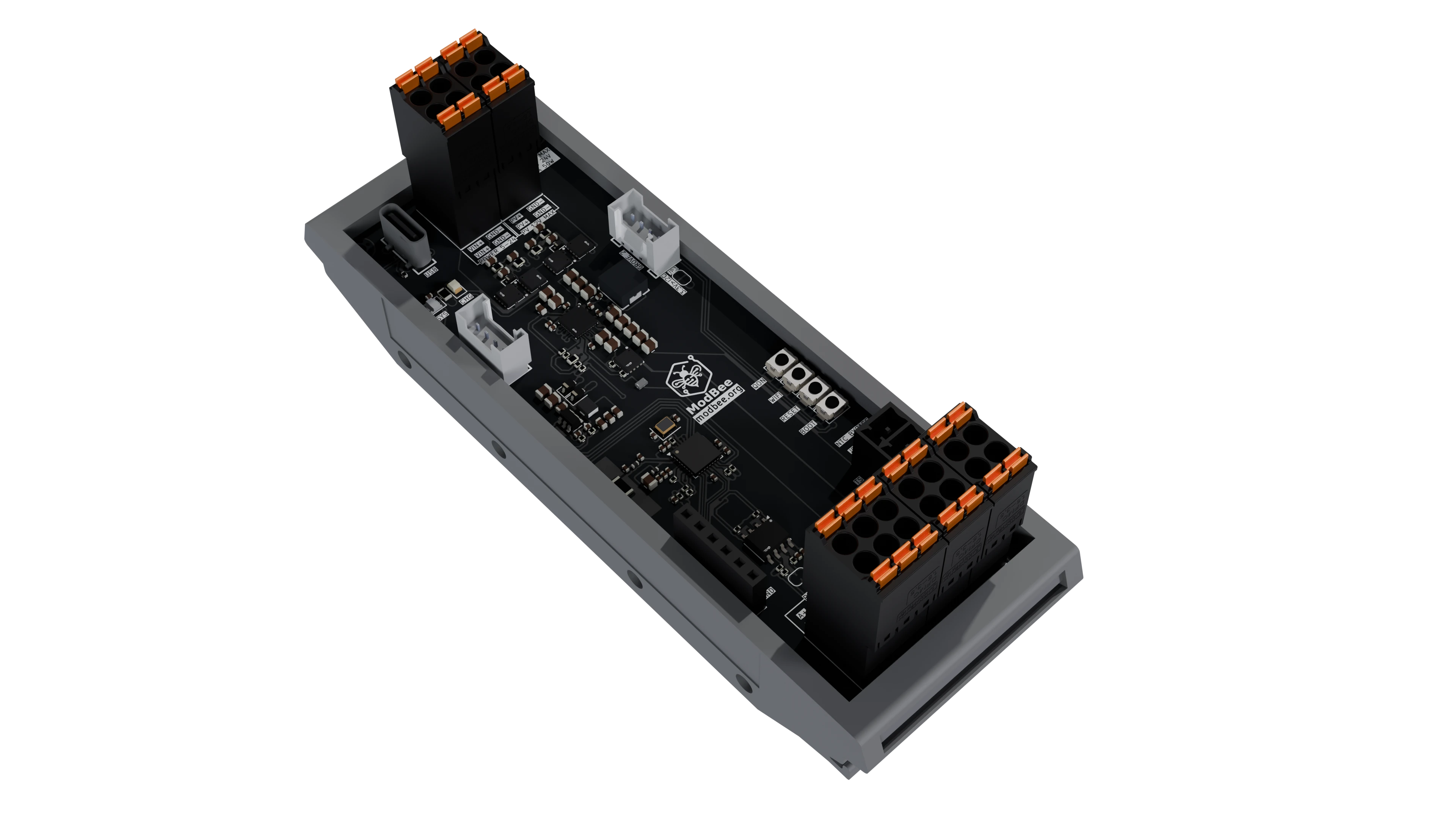
Features
- BQ25798 charging. Buck-boost charger with charge voltage and current set from the web interface.
- Two inputs.
- PV input with the BQ25798's VOC-sampling MPPT.
- A second DC input (5-24 V).
- Automatic selection between them through external FET pairs.
- Battery. 2S to 4S Li-ion, Li-Po or LiFePO4. JEITA temperature control from a 10 kΩ NTC.
- Load output. From the charger's SYS rail (NVDC power path): it runs from the inputs when present and from the battery otherwise.
- Protection. TVS diodes and RC snubbers on the inputs, battery and load output (schematic rev 0.02).
- Web interface. Live dashboard, settings and register-level debug page, served from the board's own Wi-Fi access point.
- Unattended operation. Settings are stored on the board and re-applied at every boot, and charging resumes automatically after any power loss.
- Expansion. RS485 transceiver with switchable termination, two Grove I2C ports and four spare GPIO on a header.
- Packaging. A 35 mm DIN-rail enclosure, 118 × 42 × 45 mm.
Specifications
| Item | Value |
|---|---|
| Charger | TI BQ25798, buck-boost, I2C address 0x6B |
| Microcontroller | ESP32-C3FH4: RISC-V up to 160 MHz, 4 MB flash, Wi-Fi 4, Bluetooth 5 LE, chip antenna |
| POWER input | 5 V to 24 V DC |
| PV input | 12 V nominal panel, Voc 24 V max, 3 A, 50 W |
| Battery | 2S to 4S, 6 V to 18 V, charge current up to 3 A |
| Load output | 3 A, at battery voltage (SYS rail) |
| Logic supply | 3.3 V synchronous buck from SYS or USB |
| Interfaces | USB-C (programming, serial console), RS485, 2 × Grove I2C (3.3 V), GPIO header |
| Indicators | WS2812B RGB status LED (SYS), charger status LED (CHG) |
| Buttons | WIFI, RESET, BOOT, QON |
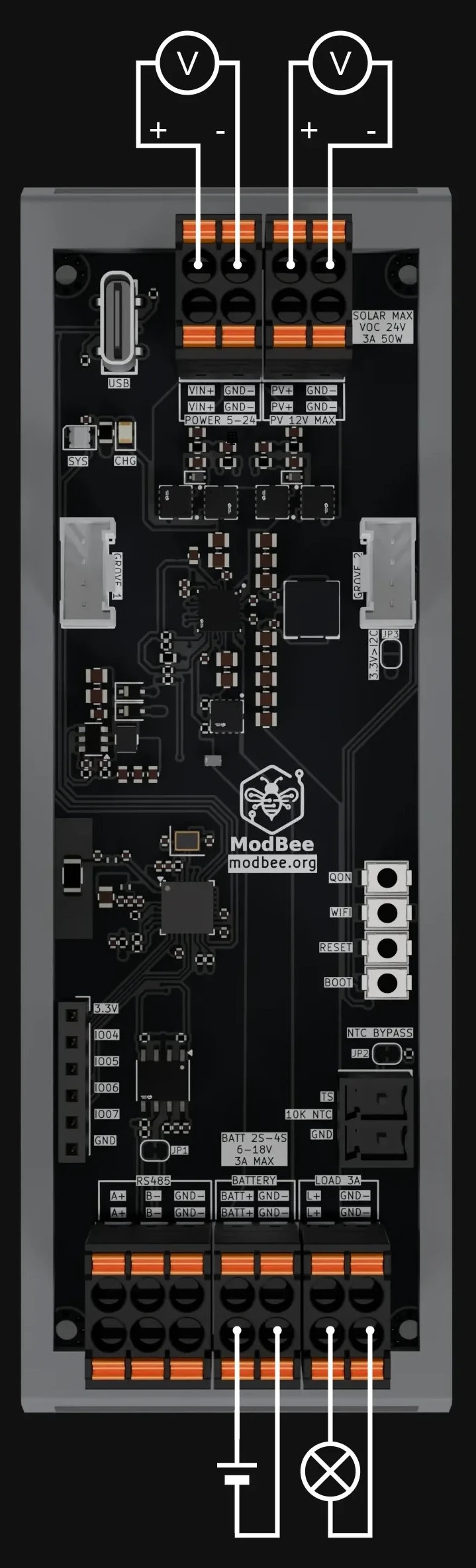
There is no reverse-polarity protection on the power terminals. Reversed wiring can damage the charger IC and the battery-side capacitors, so check polarity before connecting.
Connection order
The charger is enabled in hardware so it can run unattended. Connect the battery first, so the ESP32-C3 applies your saved battery settings before any charging source is present.
| Connecting | Disconnecting |
|---|---|
| 1. Battery | 1. Load |
| 2. PV and/or POWER input | 2. PV and/or POWER input |
| 3. Load | 3. Battery |
The reasons for this order, and what to avoid, are in docs/HARDWARE.md.
Quick start
git clone https://github.com/mod-bee/modbee-mppt-ti-c3.git
cd modbee-mppt-ti-c3
pio run -t upload      # firmware
pio run -t uploadfs    # web interface
- Connect the battery.
- Join the
ModbeeMPPTWi-Fi network and open http://192.168.4.1/.- It is an open network with no password.
- If the network is not visible, press WIFI.
- On Settings, set the battery type, cell count, charge voltage and current. The default is 3S Li-Po, 12.6 V, 1.0 A.
- Connect the panel or DC supply, then the load.
Full instructions are in docs/GETTING_STARTED.md.
Firmware status
| Feature | Status |
|---|---|
| Charging, MPPT, dual input, telemetry | Implemented |
| Web dashboard, settings and debug pages | Implemented |
| Settings and energy statistics stored on the board | Implemented |
| Wi-Fi timeout, WIFI button, light sleep | Implemented |
| Modbus RTU over RS485 | Planned |
| I2C target (slave) telemetry over Grove | Planned |
| Bluetooth LE | Not implemented |
Documentation
| Document | Content |
|---|---|
| Getting Started | Build, flash, wiring, first configuration, troubleshooting |
| Hardware | Ratings, connectors, connection order, schematic walkthrough, pin map |
| Software | Firmware architecture, start-up sequence, settings file, WebSocket protocol |
| API Reference | ModbeeMpptAPI methods and examples |
| Schematics | Rev 0.01 and rev 0.02 (PDF) |
Repository layout
src/            Application entry point (main.cpp)
lib/ModbeeMPPT/ Charger controller, API, settings, web server, power saving
lib/bq25798/    BQ25798 register driver
lib/...         Third-party libraries (vendored)
data/           Web interface, uploaded to LittleFS
docs/           Documentation
schematics/     Schematic PDFs
images/         Board renders
Contributing
Issues and pull requests are welcome. Areas where help is useful:
- Modbus RTU telemetry over the RS485 port
- I2C target telemetry on the Grove port
- Additional battery profiles and web interface improvements
Test changes that affect charging on real hardware with a fused battery.
License
This project is licensed under the GNU Affero General Public License v3.0. See LICENSE.
Third-party code in lib/ keeps its own license:
- ArduinoJson, FastLED, ESP32_SoftWire: MIT
- ESPAsyncWebServer, AsyncTCP: LGPL-3.0
- BQ25798 driver: BSD. Derived from the Adafruit BQ25798 library by Limor Fried/Ladyada for Adafruit Industries.
Disclaimer
This is a lithium battery charger. Incorrect settings or wiring can damage batteries and cause fire. Use cells with their own protection (BMS), fuse the battery connection, and verify the settings against your battery's datasheet before leaving the charger unattended.