
ModBee Hat – LTE (A7670G)
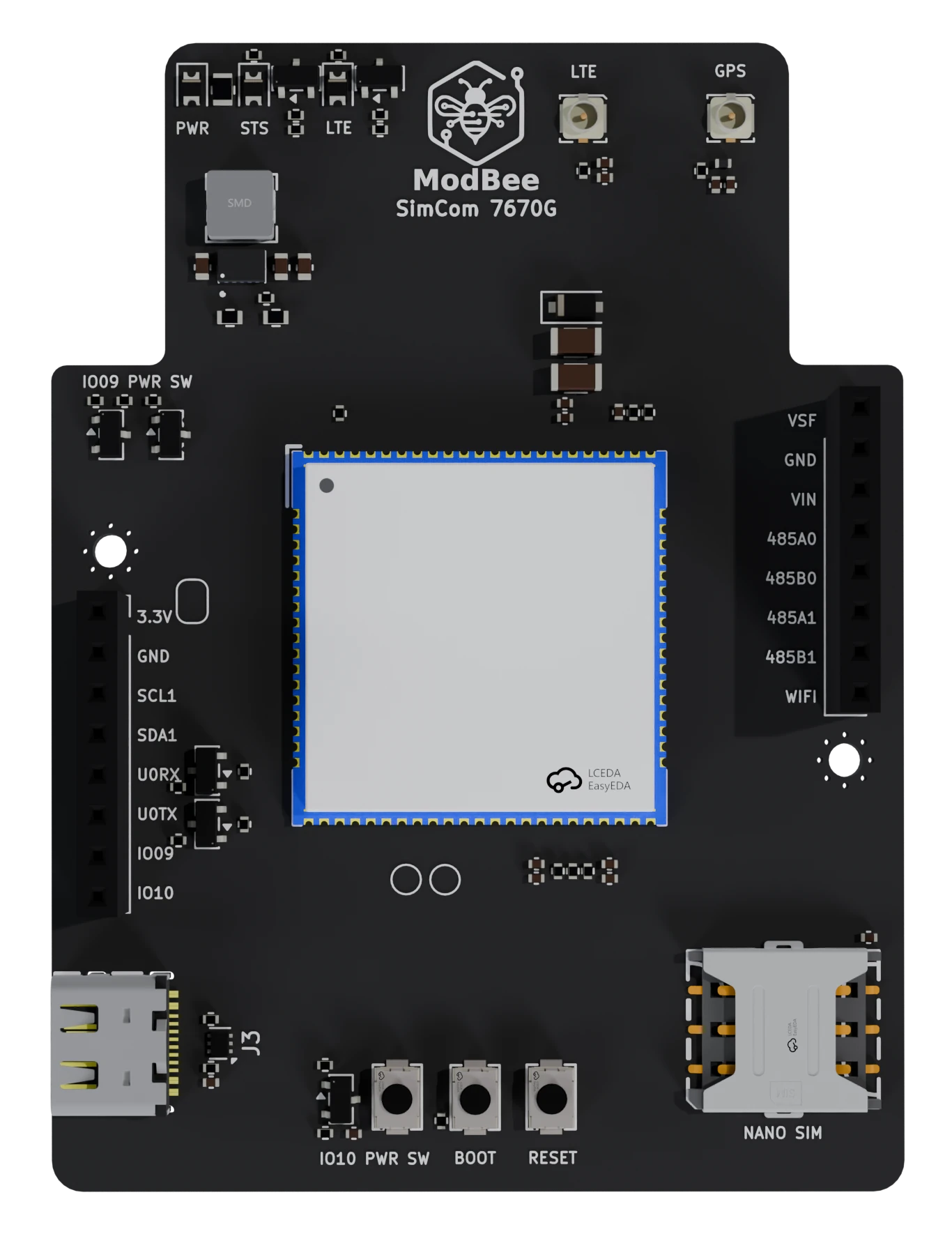
LTE Cat-1 cellular hat for the ModBee Node-UIO, built around the SIMCom A7670G. It provides 4G LTE Cat-1 with GSM/GPRS/EDGE fallback, for sites without Wi-Fi that need more bandwidth than Cat-M1 or NB-IoT.
The Node-UIO talks to the module with AT commands over UART0. A USB-C port on the hat gives a PC direct access to the module.
Module
Figures from SIMCom's A7670G module specification.
| Parameter | Value |
|---|---|
| Networks | LTE Cat-1, GSM/GPRS/EDGE |
| LTE-FDD bands | B1/2/3/4/5/7/8/12/13/18/19/20/25/26/28/66 |
| LTE-TDD bands | B38/39/40/41 |
| GSM bands | 850/900/1800/1900 MHz |
| Peak data rate | LTE 10 Mbps down / 5 Mbps up; EDGE 236.8 kbps; GPRS 85.6 kbps |
| Supply (VBAT) | 3.4–4.2 V, 3.8 V typical. The hat supplies 3.6 V |
| SIM | 1.8 V / 3 V |
| Logic level | 1.8 V. The hat level-shifts it to 3.3 V |
| Package | LCC + LGA, 24 × 24 × 2.4 mm |
| Operating temperature | −40 to +85 °C |
Network and band support depends on your carrier and country. Check that your SIM and carrier support LTE on the bands above. Some carriers no longer run 2G.
GNSS
The hat has a GPS antenna connector wired to the module's GNSS pins. GNSS works only if the fitted module variant includes a GNSS receiver. SIMCom's A7670G specification doesn't list GNSS, so check the exact part number and suffix with your supplier if you need positioning.
Board features
- Power: GPIO9 high switches the hat's 3.3 V rail on through a P-channel MOSFET. JP1 bypasses the switch. A buck-boost converter (U1) makes the module's 3.6 V supply from that rail.
- Power key: GPIO10 drives the module's PWRKEY through a transistor. GPIO10 high pulls PWRKEY low. The PWR button (SW1) does the same by hand.
- UART: the module's main UART connects to the Node-UIO's U0RX/U0TX (GPIO44/GPIO43) through MOSFET level shifters, 3.3 V to 1.8 V.
- USB-C (USB 2.0) connects straight to the module's USB, with ESD protection. Use it for AT commands from a PC and for module firmware updates. USB doesn't power the module, so the hat must be powered from the Node-UIO.
- Buttons: BOOT (SW2) pulls USB_BOOT high for USB firmware download. RESET (SW3) resets the module.
- Nano SIM holder.
- Antennas: two IPEX (U.FL) connectors, LTE and GPS. The GPS connector supplies 3.3 V bias for an active GNSS antenna.
- LEDs: PWR (hat powered), STS (module STATUS), LTE (module NETLIGHT).
The module's audio, camera, LCD, SPI, I2C and keypad interfaces are not connected on this hat.
Connections
The hat headers J1 and J2 follow the common hat connector pinout. This hat uses:
| Signal | ESP32-S3 | Function |
|---|---|---|
| +3.3V, GND | – | Hat supply |
| GPIO9 | GPIO9 | Hat power enable (high = on) |
| GPIO10 | GPIO10 | PWRKEY (high = key pressed) |
| U0RX | GPIO44 | Module TXD → Node-UIO |
| U0TX | GPIO43 | Node-UIO → module RXD |
Only one cellular hat can be fitted. The CAT and LTE hats both use UART0 and GPIO10.
Power key and LEDs
Timings from SIMCom's A7670 series hardware design. Check them against the document for your module revision.
- On: pulse PWRKEY low (GPIO10 high). The typical pulse is 50 ms. The example below uses 500 ms, well short of the 2.5 s power-off time. The UART is ready about 11 s later.
- Off: hold PWRKEY low for at least 2.5 s, or send
AT+CPOF.
| LED | Meaning |
|---|---|
| PWR | Hat 3.3 V rail is on |
| STS | On when the module is powered and initialised |
| LTE | LTE: steady on while searching, 200 ms on/off when registered or transferring data. 2G: 800 ms on/off when registered, 200 ms on/off during data. Off: powered down or asleep |
Getting started
- With power off, insert a nano SIM and connect the LTE antenna.
- Fit the hat to the Node-UIO with stacking headers.
- Power the hat and press PWRKEY from your sketch:
#include <Arduino.h>

constexpr int HAT_POWER = 9;   // high = hat powered
constexpr int PWRKEY    = 10;  // high = PWRKEY pressed
constexpr int MODEM_RX  = 44;  // U0RX
constexpr int MODEM_TX  = 43;  // U0TX

// UART0. Log over native USB so UART0 is free for the modem.
HardwareSerial modem(0);

void setup() {
  pinMode(PWRKEY, OUTPUT);
  digitalWrite(PWRKEY, LOW);
  pinMode(HAT_POWER, OUTPUT);
  digitalWrite(HAT_POWER, HIGH);
  delay(1000);

  digitalWrite(PWRKEY, HIGH);
  delay(500);
  digitalWrite(PWRKEY, LOW);

  modem.begin(115200, SERIAL_8N1, MODEM_RX, MODEM_TX);
  delay(12000);
  modem.println("AT");
}
- Check the module answers
OK, then set up the network, for example:AT+CPIN?: SIM readyAT+CNMP=38: LTE only (2= automatic)AT+CGDCONT=1,"IP","your.apn": set your carrier's APNAT+CSQ,AT+CEREG?: signal strength and registration
The A76XX series AT command manual covers TCP/UDP, HTTP(S), MQTT and, on GNSS variants, positioning (AT+CGNSSPWR).
Documentation
Hardware design and AT command manuals for the A7670 series are on the A7670X product page. The downloads need a free SIMCom account.