
ModBee Hat – LoRa Mesh
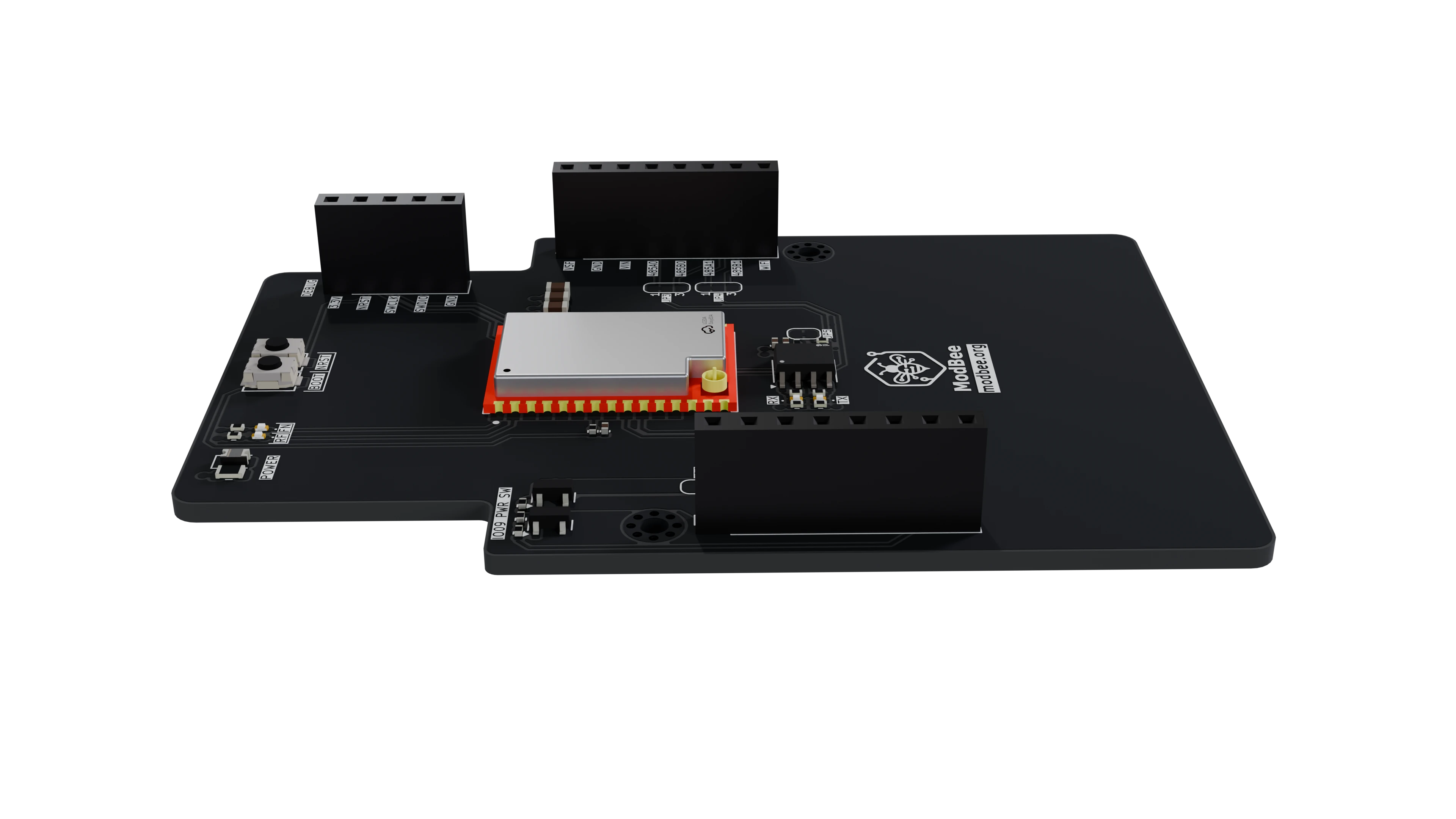
LoRa mesh radio hat for the ModBee Node-UIO, built around the Ebyte E52-900NW22S. The module routes data through other nodes in the mesh with no coordinator, so serial data sent at one node arrives at another.
By default the hat connects the module to one of the Node-UIO's RS485 channels through an on-board transceiver. Solder jumpers can connect it directly to the Node-UIO's UART0 instead.
The board also accepts the pin-compatible E52-400NW22S for the 410–509 MHz band.
Module
Figures from Ebyte's product page and user manual for the E52-900NW22S.
| Parameter | Value |
|---|---|
| Frequency | 850.125–929.125 MHz, 80 channels at 1 MHz spacing (default 868.125 MHz) |
| Modulation | LoRa |
| Transmit power | −9 to +22 dBm, configurable |
| Air data rate | 7 / 21.875 / 62.5 kbps |
| Receive sensitivity | −121 / −116 / −111 dBm at those rates |
| Range (Ebyte test) | 2.5 / 2.0 / 1.6 km at those rates. Clear line of sight, 3.5 dBi antenna, 2.5 m height |
| Packet size | 200 bytes maximum |
| Interface | UART, 3.3 V logic, up to 460800 baud |
| Supply | 1.8–3.6 V (no internal regulator; full output power needs ≥ 3.3 V) |
| Current | ~128 mA transmitting (peak), ~14 mA working |
| Mesh | Routing and terminal nodes, no coordinator, self-healing multi-hop routes |
| Addressing | Unicast, multicast, broadcast and anycast |
| Configuration | AT commands over the UART, or Ebyte's RF_Setting_E52 tool |
| Antenna | IPEX connector on the module |
| Size | 20 × 14 mm, 1.2 g |
| Operating temperature | −40 to +85 °C |
The E52-400NW22S has the same specification on 410.125–509.125 MHz (100 channels, default 433.125 MHz).
Radio regulations
The module ships set to 868.125 MHz at up to +22 dBm. Many countries don't allow that. Set the channel and transmit power to match your local rules before you deploy.
- New Zealand and Australia: use 915–928 MHz. On the 900 MHz module, channel n is 850.125 + n MHz, so channels 65–77 sit at 915.125–927.125 MHz. Choose a channel whose full signal bandwidth stays inside the band. At 868 MHz, NZ allows only 3 dBm EIRP and Australia's LIPD class licence has no allocation.
- Europe: 868.0–868.6 MHz is limited to 25 mW ERP with a 1 % duty cycle or listen-before-talk. Reduce the transmit power to suit.
Ebyte's manual lists the AT commands for channel (AT+CHANNEL), power (AT+POWER), air rate (AT+RATE), network ID (AT+PANID), node type (AT+TYPE) and addresses.
Board features
- RS485 transceiver (U2) between the module UART and the Node-UIO's RS485 bus. It is wired like the Node-UIO's own transceivers, with RE and DE tied high, so there is no direction-control pin.
- RS485 channel select: JP3 and JP4 choose CH1 or CH2.
- 120 Ω termination for the end of the RS485 bus (JP5).
- Direct UART option: JP1 and JP2 connect the module to UART0.
- Hat power switch: GPIO9 high turns the hat on. JP6 bypasses the switch.
- Buttons: SW1 BOOT (module PA0) and SW2 RESET (module NRST).
- LEDs: hat power (D1), module status on PB3 and PB4 (D2, D3), UART TX and RX activity (D4, D5).
- J3 SWD header for programming the module's microcontroller.
Solder jumpers
| Jumper | Function | Default |
|---|---|---|
| JP1, JP2 | Connect module TX/RX to U0RX/U0TX (GPIO44/GPIO43) | Open (module on RS485) |
| JP3, JP4 | Connect the transceiver to RS485_A_0/B_0 (CH1) or RS485_A_1/B_1 (CH2) | CH1 |
| JP5 | 120 Ω RS485 termination. Cut to remove it | Bridged (terminated) |
| JP6 | Bypass the GPIO9 power switch (hat always on) | Open |
Terminate an RS485 bus only at its two physical ends. If the hat is not at an end of the bus, cut JP5. Set JP3 and JP4 to the same channel.
Connectors
The hat headers J1 and J2 follow the common hat connector pinout. This hat uses +3.3V, GND and GPIO9, plus either RS485 CH1/CH2 (default) or U0RX/U0TX (JP1/JP2 bridged).
J3 – SWD debug (ST-Link compatible)
| Pin | Signal |
|---|---|
| 1 | +3.3V |
| 2 | NRST |
| 3 | SWCLK |
| 4 | SWDIO |
| 5 | GND |
Getting started
- Fit a 900 MHz antenna to the module's IPEX connector. Don't transmit without an antenna.
- Check the jumpers. By default the module is on RS485 CH1 with termination fitted.
- Fit the hat to the Node-UIO with stacking headers.
- Drive GPIO9 high to power the hat, or bridge JP6.
- Open the Node-UIO's RS485 CH1 port (UART1,
Serial1) at the module's baud rate. Use CH2 (UART2,Serial2) if JP3/JP4 select CH2. - Set the channel, power, network ID and node type with AT commands. Give every node in a network the same channel, air rate and network ID.
- After that, serial data written to the port is carried across the mesh.
Full module documentation: E52-900NW22S · E52-400NW22S
Schematic
schematics/modbee-hat-loramesh.pdf